Project Management and Budgeting: 7 Steps to Keep Your Budget on Track


As the year draws to a close, many managers begin budgeting for new initiatives and reviewing the assumptions behind ongoing projects. How do you build a budget that captures the full cost of delivery, reduces the risk of inaccurate estimates, and remains useful throughout the project? This guide to project management and budgeting walks through seven practical steps, highlights common causes of budget variances, and explains how the right tools can support cost estimation, spending oversight, and a faster response to overruns.
1. Define the Project’s Target ROI
Effective project budgeting starts with a clear definition of the outcome you want to achieve and when you expect to achieve it. The goal should be measurable, address an organizational need, and allow you to assess results once the work is complete.
ROI (return on investment) expresses the net gain from an initiative as a percentage of its total cost. At this stage, you are defining the project’s expected return—not reporting a result it has already delivered. Document your target return and the period over which you will measure it. Later, you will determine which costs to include in the assessment.
If the project primarily aims to improve quality, shorten service times, or reduce errors, define separate metrics for those outcomes. ROI must be expressed numerically, so translate qualitative goals into financial benefits for the business. This will show how the project’s assumptions support the investment case.
Example of an ROI Target
“Achieve an ROI of at least 50% within 12 months of launching a new request-handling process. With a total investment of EUR 100,000, the project should generate EUR 150,000 in net savings during the first year following business process automation.”
2. Establish the Budget Structure
Once you know what outcome will justify the investment, define the project budget components and how they will be organized:
- Cost components: Specify what each expense covers and which work package it belongs to. Separate direct costs, such as contractor labor and materials, from indirect costs. Establish a method for allocating shared costs to the project so that nothing is omitted or counted twice.
- Cost center: Assign each line item to the appropriate business unit or function in line with your organization’s accounting structure.
- Cost owner: Identify who develops the assumptions for each line item, monitors spending against it, and explains variances. Keep that responsibility separate from the authority to approve spending or budget changes.
- Funding source: Specify whether the expense will be covered by company funds, external financing, or a combination of both. Identify when funds are expected to become available and align that timing with the payment schedule.If you are using grant funding, distinguish eligible costs, ineligible costs, and the required contribution from your own funds according to the program’s rules. A funding award is not a substitute for a cash flow plan: confirm that funds will be available when you need to pay your team, suppliers, or other costs associated with upcoming project phases.
This step establishes the budget framework and clarifies accountability. Next, you will populate it with estimates based on resources, rates, and historical data.
3. Estimate Project Costs
Cost estimation and budgeting in project management should account for every resource needed to deliver the intended outcome. The specific categories and their relative share will depend on the initiative: capital investment, marketing, research, and technology projects have different cost profiles. Your project budget breakdown may include:
- Team members, experts, or subcontractors
- Materials
- Equipment
- Licenses
- Communication
- Testing
- Training
- Implementation
- Ongoing maintenance of project deliverables
For example, in a software development project, coding and development may account for around 60% of the budget, QA for 15–20%, UX/UI for 5–10%, and maintenance for 15–25%.
If you have already defined the project’s goals and deliverables and developed a work breakdown structure (WBS), you should have a solid understanding of the costs you will incur during delivery.
If you are starting a project similar to an earlier initiative, use historical data. Compare planned and actual costs, labor hours, resource utilization, and the reasons for previous variances. Be sure to adjust that data for changes in scope, rates, material prices, inflation, and current market conditions. The previous budget should be a reference point, not a template to copy unchanged.
Common Cost Estimation Mistakes
- Overly optimistic assumptions
- Underestimating the work required
- Poorly defined scope
- Failing to account for the availability of key specialists
- Leaving out project management, communication, rework, migration, acceptance activities, and maintenance costs
- Copying a previous project’s budget without checking for differences in data, integrations, requirements quality, or the regulatory environment
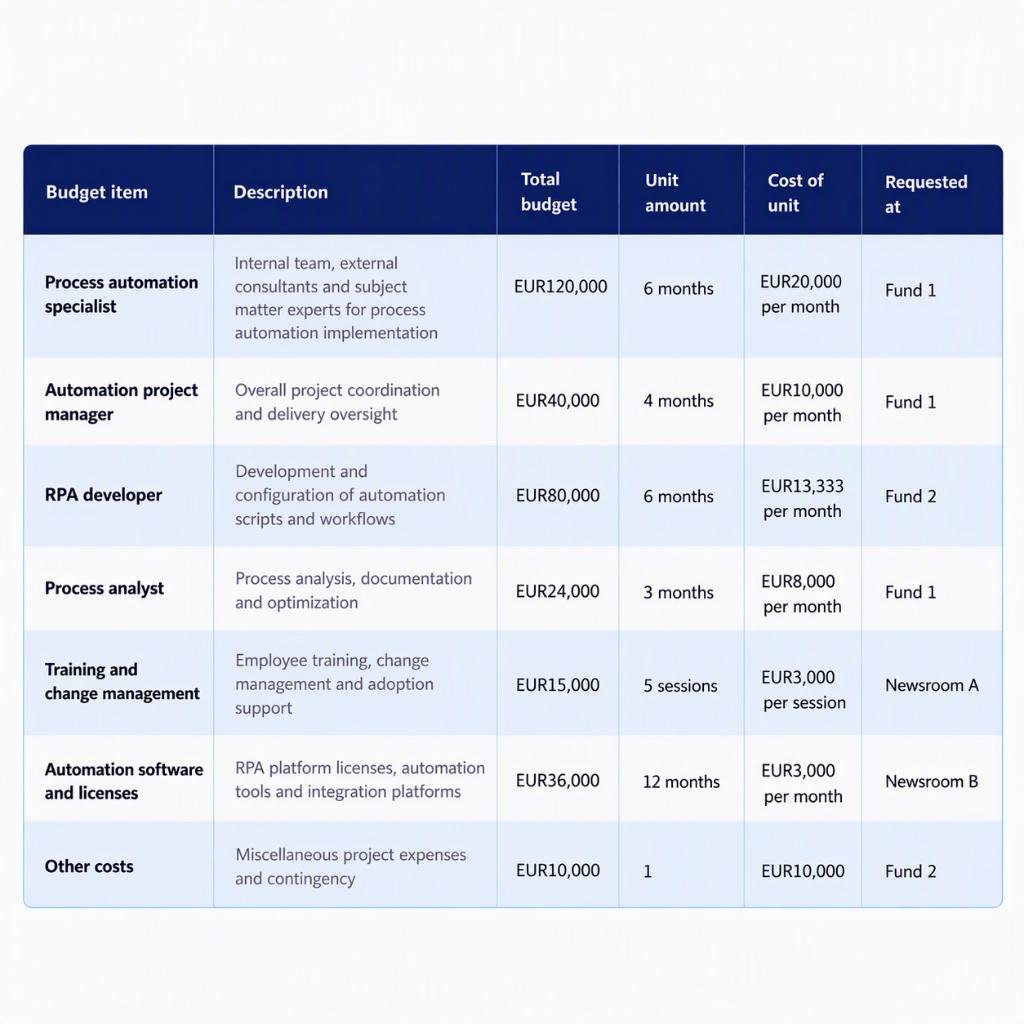
4. Set a Project Budget Contingency
You cannot predict everything—and it is worth acknowledging that. A mature project budgeting process includes a contingency reserve: an explicit allowance for uncertainty. Set its size based on identified risks, the quality of available data, price and schedule volatility, supplier dependencies, and the availability of critical resources. The less stable the project’s assumptions, the larger the financial cushion it may need.
Address this area by asking three key questions:
- What events would trigger the use of contingency funds?
- Who decides whether to use the contingency reserve?
- When does a risk require escalation?
5. Obtain Project Budget Approval
Before the project starts, the appropriate stakeholders should formally approve the budget. The approved project budget baseline then provides a reference for comparing planned and actual spending. It is equally important to establish who owns each cost, who approves exceptions, and how decisions are documented.
6. Keep Project Budget Tracking on Schedule
To avoid an unpleasant surprise at project closeout, monitor the budget throughout delivery. A practical review cadence might include weekly operational reviews, a monthly forecast, and management reviews for higher-risk projects. A project budget dashboard that brings together data from multiple sources can show what is off track, why it has changed, how it will affect KPIs, and what options are available. The tools discussed below can give you real-time visibility into the budget.
4 Common Warning Signs That Budget Control Is Slipping
- Decisions bypass the approval workflow. Spending, changes, or purchase orders are initiated outside the agreed process and without checking limits.
- Costs have no owner. Variances are visible, but no one is responsible for explaining them or taking corrective action.
- The decision history cannot be reconstructed. The team does not know who changed the scope, schedule, or funding allocation—or why.
- Changes go straight into implementation. Change requests lack a cost estimate, an impact assessment, or formal approval.
Project Budgeting Software and Tools for Oversight
Project budgeting relies on data generated in many places. Depending on the initiative, these may include financial and project management systems, spreadsheets, contracts, purchase orders, invoices, time tracking records, technical documentation, or marketing tools. Each source shows part of the picture, but not the full context behind a decision. For budgeting, you therefore need a system that:
- Connects data from ERP systems, project applications, databases, SharePoint, and other sources
- Builds a historical record of project costs, labor requirements, and resource utilization
- Records the assumptions and sources behind every estimate
- Supports estimation by comparing plans with actual results and analyzing previous variances
- Displays the budget assigned to each cost center or project
- Assigns owners to tasks, costs, and decisions
- Automates approval workflows and enforces agreed limits
- Shows the current budget, costs, commitments, reserves, and forecast final cost in one place
- Maintains a change history and lets users trace a metric back to its source document
- Triggers notifications and alerts before the budget is exceeded
- Updates forecasts when prices, rates, or scope change
- Allows budget plans to be revised and processes to be expanded in stages without replacing existing systems
With GoNextStage, a WEBCON Premium Partner, you can build this environment and efficiently roll out a Budgeting module across your organization. GoNextStage uses ready-made business modules: PBMs. These modules significantly shorten implementation by eliminating the most time-consuming stages of automation: solution concept development, process mapping, and architecture design. Learn more about Proven Business Modules.
7. Measure ROI After Project Completion
Closing out a project should involve more than checking whether it stayed within budget. Assess whether it delivered the expected benefits: time savings, lower process costs, increased revenue, better quality, greater reach, or fewer errors.
Conclusion
Effective project management and budgeting require clearly defined goals, comprehensive cost estimates, a contingency reserve, and formal approval of the underlying assumptions. Ongoing cost monitoring is just as important during delivery. WEBCON, together with GoNextStage’s PBM Budgeting module, supports budgeting by connecting information from different systems, clarifying accountability, and continuously monitoring how funds are used.
About author