
Procurement and contract management software
Take your procurement process to the next level
Order delays and unpredictable lead times disrupt operations and drive up costs. Bring purchasing and contract management into one connected workflow—from request and line-item entry through multilevel approvals, fulfillment, receipt, and invoice settlement. With procurement and contract management software from GoNextStage, your teams can track progress, manage exceptions, and keep purchasing decisions aligned with project and budget requirements.
Proven foundation for your procurement and contract management

Proven business process model and approval paths

Standardized data model

Business rules and integrations tailored to your organization
Key procurement and contract management software functionalities
End-to-end procure-to-pay process
on one platform
Contract management
Supplier management
Purchase Order registration and approval workflow
Line-item details, including item or service description, type, quantity, price, VAT, cost center, project, and account
Supplier-specific order subprocesses
and PO document generation
AI-powered invoice processing
LLM-assisted extraction of supplier quote data to initiate an order, with user review
Automated document generation and links between invoices, purchase orders, and contracts
Order monitoring
through linked invoices
AI-supported risk and discrepancy detection
Full history
of versions, decisions, approvals and payments
Alerts about renewals or amendments
Integrations
with ERP, offer workflows, contract workflows, and other business processes
Delivery details and payment terms
Currency and exchange rate handling
Multilevel approval matrices
based on cost centers or project-linked accounts
Creation and processing of receipt records linked to purchase orders
Support for partial and full receipts
Start seeing improvements within weeks of kickoff

Long-term gains of procurement and contract management process with GoNextStage
Adapt the workflow to the way you buy
Tailor procurement and contract management software to your purchasing policies, approval paths, supplier structure, contract requirements, and ERP environment. Define which purchases require receipt confirmation, how approvals follow cost ownership, and how exceptions are resolved.
For construction companies, an optional connection to a 3D building model can extend the workflow. WEBCON can use material parameters from an Autodesk model to support purchase requests based on project documentation and supplier-specific orders. The BIM connection and its scope are agreed during analysis to help reduce mismatches that could disrupt the construction schedule.

Possible integrations




How procurement and contract management software connects each step
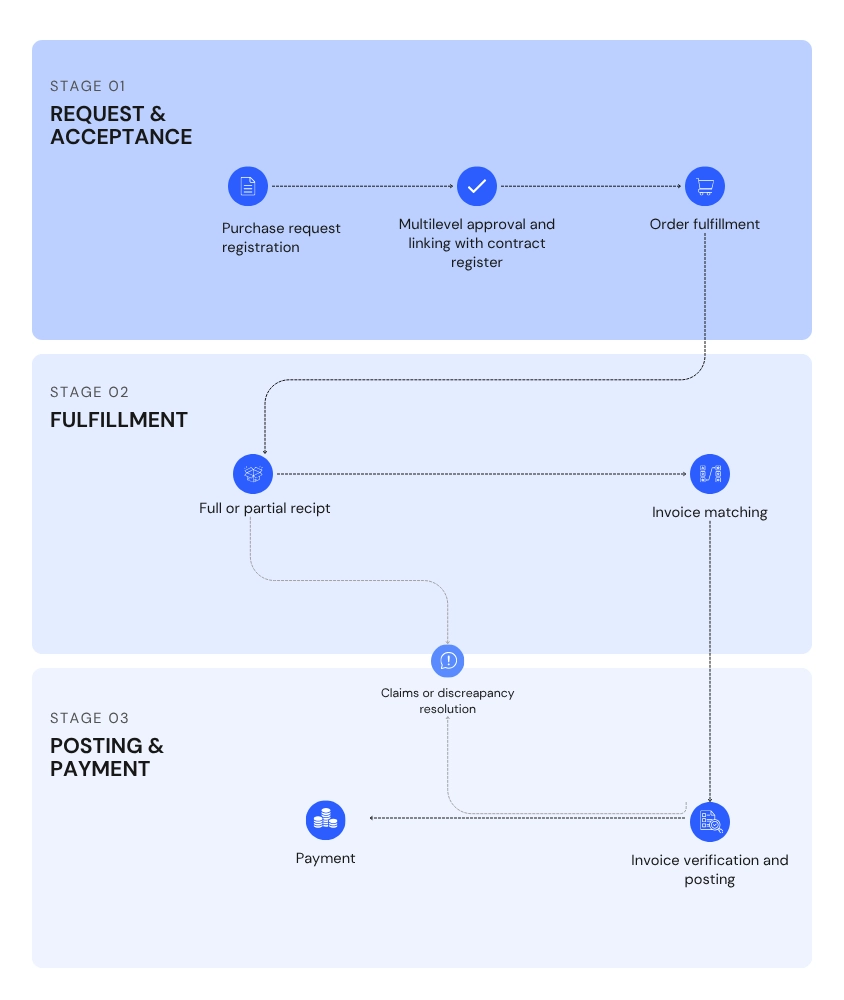

Purchase request registration
Supplier information, delivery details, payment terms, and requested goods or services are entered in the system. Line items are linked to a project, cost center, and account. The system calculates order values and can use AI to populate the form with supplier quote data, subject to user review. A purchase order is created and linked to the relevant contract.
Multilevel approval
The order moves through the required approval levels. The system verifies that all required decisions are recorded before advancing the workflow. Links to the contract register provide access to the associated project and its requirements.

Order fulfillment
The approved order is submitted to ERP where required or moves directly to fulfillment. Its current status is tracked in WEBCON. Purchases that do not require formal receipt can proceed directly to invoice settlement.

Receipt and verification
Actual quantities and amounts are recorded in a receipt linked to the order. The system supports partial and full receipts. Following a partial receipt, the order returns to fulfillment, with outstanding quantities visible in the system. Full receipt opens the settlement stage when formal receipt is required.

Supplier claims handling
Deliveries that do not meet requirements are routed through the agreed claims process. Supplier records support vendor identification and verification of the scope and timing of each claim.

Invoice matching
The system extracts incoming invoice data and matches the invoice to the appropriate PO using details such as the order number, supplier, cost center, cost owner, or expense category.

Invoice verification and posting
Invoice data is compared with order data. Matching documents can move automatically to posting with the appropriate cost center and cost owner.

Discrepancy resolution
Differences in quantity, price, or scope are routed for review, with details identifying each mismatch.

Payment preparation
The approved invoice is sent to ERP as a complete document ready for payment processing.